Missing Manuals - io_uring worker pool
Chances are you might have heard of io_uring. It first appeared in Linux 5.1, back in 2019, and was advertised as the new API for asynchronous I/O. Its goal was to be an alternative to the deemed-to-be-broken-beyond-repair AIO, the “old” asynchronous I/O API.
Calling io_uring just an asynchronous I/O API doesn’t do it justice, though. Underneath the API calls, io_uring is a full-blown runtime for processing I/O requests. One that spawns threads, sets up work queues, and dispatches requests for processing. All this happens “in the background” so that the user space process doesn’t have to, but can, block while waiting for its I/O requests to complete.
A runtime that spawns threads and manages the worker pool for the developer makes life easier, but using it in a project begs the questions:
1. How many threads will be created for my workload by default?
2. How can I monitor and control the thread pool size?
I could not find the answers to these questions in either the Efficient I/O with io_uring article, or the Lord of the io_uring guide – two well-known pieces of available documentation.
And while a recent enough io_uring man page touches on the topic:
By default,io_uringlimits the unbounded workers created to the maximum processor count set byRLIMIT_NPROCand the bounded workers is a function of the SQ ring size and the number of CPUs in the system.
… it also leads to more questions:
3. What is an unbounded worker?
4. How does it differ from a bounded worker?
Things seem a bit under-documented as is, hence this blog post. Hopefully, it will provide the clarity needed to put io_uring to work in your project when the time comes.
Before we dig in, a word of warning. This post is not meant to be an introduction to io_uring. The existing documentation does a much better job at showing you the ropes than I ever could. Please give it a read first, if you are not familiar yet with the io_uring API.
Not all I/O requests are created equal
io_uring can perform I/O on any kind of file descriptor; be it a regular file or a special file, like a socket. However, the kind of file descriptor that it operates on makes a difference when it comes to the size of the worker pool.
You see, I/O requests get classified into two categories by io_uring:
io-wqdivides work into two categories:
1. Work that completes in a bounded time, like reading from a regular file or a block device. This type of work is limited based on the size of the SQ ring.
2. Work that may never complete, we call this unbounded work. The amount of workers here is limited byRLIMIT_NPROC.
This answers the latter two of our open questions. Unbounded workers handle I/O requests that operate on neither regular files (S_IFREG) nor block devices (S_ISBLK). This is the case for network I/O, where we work with sockets (S_IFSOCK), and other special files like character devices (e.g. /dev/null).
We now also know that there are different limits in place for how many bounded vs unbounded workers there can be ruing. So we have to pick one before we dig further.
Capping the unbounded worker pool size
Pushing data through sockets is Cloudflare’s bread and butter, so this is what we are going to base our test workload around. To put it in io_uring lingo – we will be submitting unbounded work requests.
While doing that, we will observe how io_uring goes about creating workers.
To observe how io_uring goes about creating workers we will ask it to read from a UDP socket multiple times. No packets will arrive on the socket, so we will have full control over when the requests complete.
Here is our test workload - udp_read.rs.
$ ./target/debug/udp-read -h
udp-read 0.1.0
read from UDP socket with io_uring

USAGE:
    udp-read [FLAGS] [OPTIONS]

FLAGS:
    -a, --async      Set IOSQE_ASYNC flag on submitted SQEs
    -h, --help       Prints help information
    -V, --version    Prints version information

OPTIONS:
    -c, --cpu <cpu>...                     CPU to run on when invoking io_uring_enter for Nth ring (specify multiple
                                           times) [default: 0]
    -w, --workers <max-unbound-workers>    Maximum number of unbound workers per NUMA node (0 - default, that is
                                           RLIMIT_NPROC) [default: 0]
    -r, --rings <num-rings>                Number io_ring instances to create per thread [default: 1]
    -t, --threads <num-threads>            Number of threads creating io_uring instances [default: 1]
    -s, --sqes <sqes>                      Number of read requests to submit per io_uring (0 - fill the whole queue)
                                           [default: 0]
While it is parametrized for easy experimentation, at its core it doesn’t do much. We fill the submission queue with read requests from a UDP socket and then wait for them to complete. But because data doesn’t arrive on the socket out of nowhere, and there are no timeouts set up, nothing happens. As a bonus, we have complete control over when requests complete, which will come in handy later.
Let’s run the test workload to convince ourselves that things are working as expected. strace won’t be very helpful when using io_uring. We won’t be able to tie I/O requests to system calls. Instead, we will have to turn to in-kernel tracing.
Thankfully, io_uring comes with a set of ready to use static tracepoints, which save us the trouble of digging through the source code to decide where to hook up dynamic tracepoints, known as kprobes.
We can discover the tracepoints with perf list or bpftrace -l, or by browsing the events/ directory on the tracefs filesystem, usually mounted under /sys/kernel/tracing.
$ sudo perf list 'io_uring:*'

List of pre-defined events (to be used in -e):

  io_uring:io_uring_complete                         [Tracepoint event]
  io_uring:io_uring_cqring_wait                      [Tracepoint event]
  io_uring:io_uring_create                           [Tracepoint event]
  io_uring:io_uring_defer                            [Tracepoint event]
  io_uring:io_uring_fail_link                        [Tracepoint event]
  io_uring:io_uring_file_get                         [Tracepoint event]
  io_uring:io_uring_link                             [Tracepoint event]
  io_uring:io_uring_poll_arm                         [Tracepoint event]
  io_uring:io_uring_poll_wake                        [Tracepoint event]
  io_uring:io_uring_queue_async_work                 [Tracepoint event]
  io_uring:io_uring_register                         [Tracepoint event]
  io_uring:io_uring_submit_sqe                       [Tracepoint event]
  io_uring:io_uring_task_add                         [Tracepoint event]
  io_uring:io_uring_task_run                         [Tracepoint event]
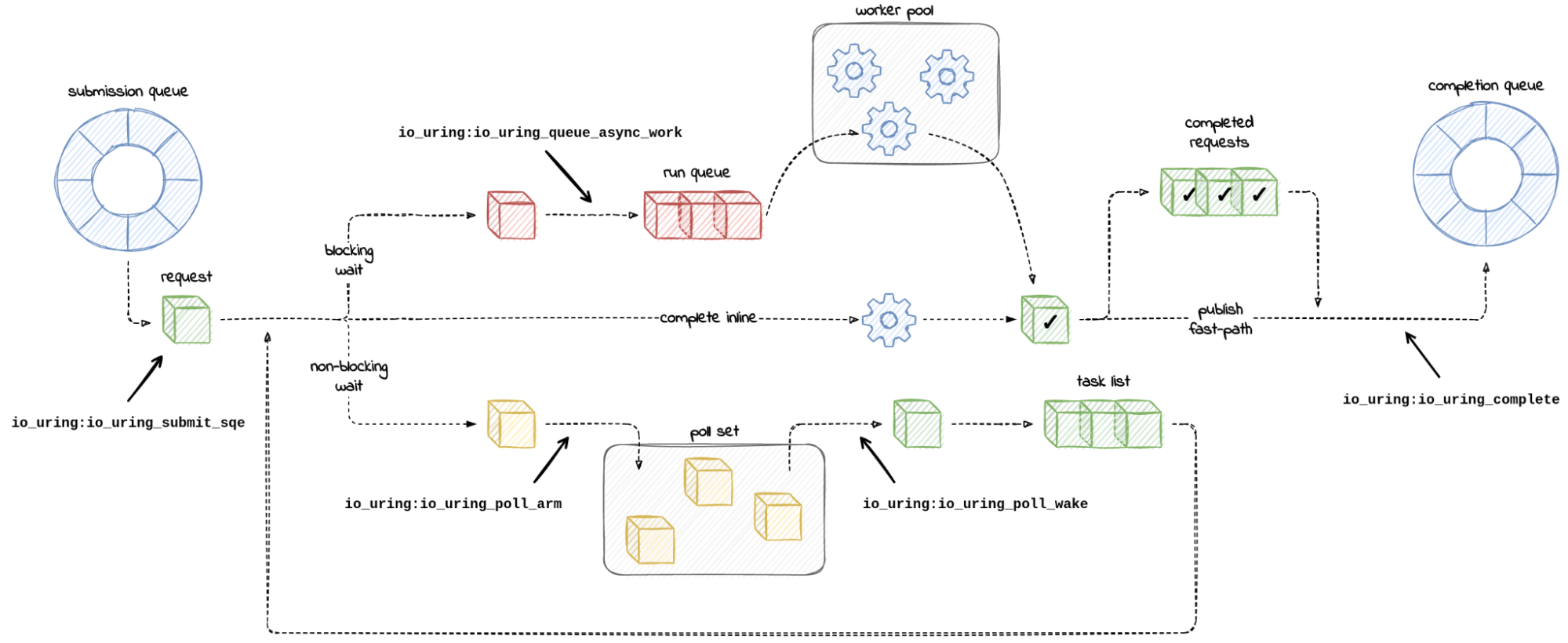
Judging by the number of tracepoints to choose from, io_uring takes visibility seriously. To help us get our bearings, here is a diagram that maps out paths an I/O request can take inside io_uring code aotated with tracepoint names – not all of them, just those which will be useful to us.
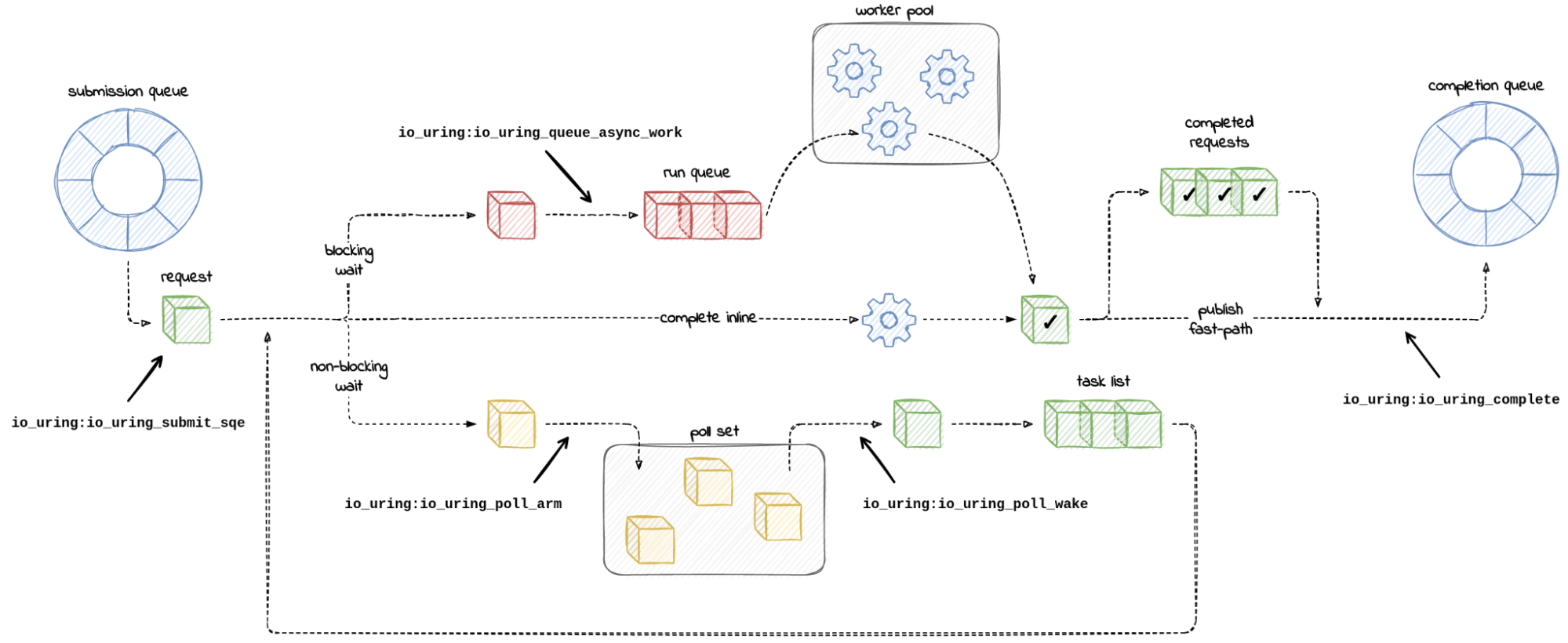
Starting on the left, we expect our toy workload to push entries onto the submission queue. When we publish submitted entries by calling io_uring_enter(), the kernel consumes the submission queue and constructs internal request objects. A side effect we can observe is a hit on the io_uring:io_uring_submit_sqe tracepoint.
$ sudo perf stat -e io_uring:io_uring_submit_sqe -- timeout 1 ./udp-read

 Performance counter stats for 'timeout 1 ./udp-read':

              4096      io_uring:io_uring_submit_sqe

       1.049016083 seconds time elapsed

       0.003747000 seconds user
       0.013720000 seconds sys
But, as it turns out, submitting entries is not enough to make io_uring spawn worker threads. Our process remains single-threaded:
$ ./udp-read & p=$!; sleep 1; ps -o thcount $p; kill $p; wait $p
[1] 25229
THCNT
    1
[1]+  Terminated              ./udp-read
This shows that io_uring is smart. It knows that sockets support non-blocking I/O, and they can be polled for readiness to read.
So, by default, io_uring performs a non-blocking read on sockets. This is bound to fail with -EAGAIN in our case. What follows is that io_uring registers a wake-up call (io_async_wake()) for when the socket becomes readable. There is no need to perform a blocking read, when we can wait to be notified.
This resembles polling the socket with select() or [e]poll() from user space. There is no timeout, if we didn’t ask for it explicitly by submitting an IORING_OP_LINK_TIMEOUT request. io_uring will simply wait indefinitely.
We can observe io_uring when it calls vfs_poll, the machinery behind non-blocking I/O, to monitor the sockets. If that happens, we will be hitting the io_uring:io_uring_poll_arm tracepoint. Meanwhile, the wake-ups that follow, if the polled file becomes ready for I/O, can be recorded with the io_uring:io_uring_poll_wake tracepoint embedded in io_async_wake() wake-up call.
This is what we are experiencing. io_uring is polling the socket for read-readiness:
$ sudo bpftrace -lv t:io_uring:io_uring_poll_arm
tracepoint:io_uring:io_uring_poll_arm
    void * ctx
    void * req
    u8 opcode
    u64 user_data
    int mask
    int events
$ sudo bpftrace -e 't:io_uring:io_uring_poll_arm { @[probe, args->opcode] = count(); } i:s:1 { exit(); }' -c ./udp-read
Attaching 2 probes...


@[tracepoint:io_uring:io_uring_poll_arm, 22]: 4096
$ sudo bpftool btf dump id 1 format c | grep 'IORING_OP_.*22'
        IORING_OP_READ = 22,
$
To make io_uring spawn worker threads, we have to force the read requests to be processed concurrently in a blocking fashion. We can do this by marking the I/O requests as asynchronous. As io_uring_enter(2) man-page says:
  IOSQE_ASYNC
         Normal operation for io_uring is to try and  issue  an
         sqe  as non-blocking first, and if that fails, execute
         it in an async maer. To support more efficient over‐
         lapped  operation  of  requests  that  the application
         knows/assumes will always (or most of the time) block,
         the  application can ask for an sqe to be issued async
         from the start. Available since 5.6.
This will trigger a call to io_queue_sqe() → io_queue_async_work(), which deep down invokes create_io_worker() → create_io_thread() to spawn a new task to process work. Remember that last function, create_io_thread() – it will come up again later.
Our toy program sets the IOSQE_ASYNC flag on requests when we pass the --async command line option to it. Let’s give it a try:
$ ./udp-read --async & pid=$!; sleep 1; ps -o pid,thcount $pid; kill $pid; wait $pid
[2] 3457597
    PID THCNT
3457597  4097
[2]+  Terminated              ./udp-read --async
$
The thread count went up by the number of submitted I/O requests (4,096). And there is one extra thread - the main thread. io_uring has spawned workers.
If we trace it again, we see that requests are now taking the blocking-read path, and we are hitting the io_uring:io_uring_queue_async_work tracepoint on the way.
$ sudo perf stat -a -e io_uring:io_uring_poll_arm,io_uring:io_uring_queue_async_work -- ./udp-read --async
^C./udp-read: Interrupt

 Performance counter stats for 'system wide':

                 0      io_uring:io_uring_poll_arm
              4096      io_uring:io_uring_queue_async_work

       1.335559294 seconds time elapsed

$
In the code, the fork happens in the io_queue_sqe() function, where we are now branching off to io_queue_async_work(), which contains the corresponding tracepoint.
We got what we wanted. We are now using the worker thread pool.
However, having 4,096 threads just for reading one socket sounds like overkill. If we were to limit the number of worker threads, how would we go about that? There are four ways I know of.
Method 1 - Limit the number of in-flight requests
If we take care to never have more than some number of in-flight blocking I/O requests, then we will have more or less the same number of workers. This is because:
io_uringspawns workers only when there is work to process. We control how many requests we submit and can throttle new submissions based on completion notifications.io_uringretires workers when there is no more pending work in the queue. Although, there is a grace period before a worker dies.
The downside of this approach is that by throttling submissions, we reduce batching. We will have to drain the completion queue, refill the submission queue, and switch context with io_uring_enter() syscall more often.
We can convince ourselves that this method works by tweaking the number of submitted requests, and observing the thread count as the requests complete. The --sqes <n> option (submission queue entries) controls how many read requests get queued by our workload. If we want a request to complete, we simply need to send a packet toward the UDP socket we are reading from. The workload does not refill the submission queue.
$ ./udp-read --async --sqes 8 & pid=$!
[1] 7264
$ ss -ulnp | fgrep pid=$pid
UNCONN 0      0          127.0.0.1:52763      0.0.0.0:*    users:(("udp-read",pid=7264,fd=3))
$ ps -o thcount $pid; nc -zu 127.0.0.1 52763; echo -e 'U1F634'; sleep 5; ps -o thcount $pid
THCNT
    9